Home (about us)
iPad and mobile devices
Ring tones for iPhone.
13515 years
by admin
in iPad and mobile devices
Ring tones for iPhone are very limited in comparison to what my previous phones have been able to do. My Nokia would let me set any music or video file as suitable as a ring tone but it is a little harder on the iPhone.
If you iPhone is jail broken, then you can pretty much put any file in the ring tones folder on your phone using ssh/ftp and you are away but your phone does not need to be jail broken to use custom ring tones.
Ring tones on the iPhone are easily added to the phone by clicking on a ring tone (in .m4r format). The m4r format is a re-branded version of the common .aac format and you can find several tools to convert to aac format. These include
The simplest of these is probably just to use iTunes itself. This allows you to find the music track (not a DPM version) and right click on it. Then Select “Create AAC version” of the track. This will copy the file, convert it into another aac extension .m4a and place it locally in your itunes music sub-directory. Mine (and the default) is under My Documents, i.e.”My Documents\My Music\iTunes\iTunes Media\Music\<Artists Name>\<Album Name>” sub directory, but you can always find it easily just by right clicking on the file and selecting “Show in Windows Explorer”.
If you then copy that .m4a file again and rename it <filename>.m4r and add that file with the iTunes \ File \ Add File to Library option it will appear in your ringtones folder. This can very easily then be synchronised with your phone or iPad and used as an alarm or ringtone etc.
Get music on i-pad
5116 years
by admin
in iPad and mobile devices
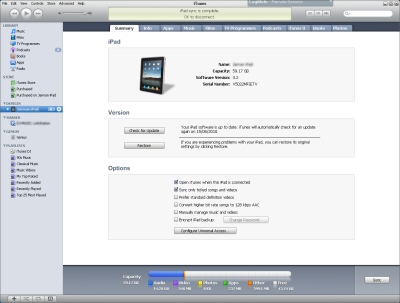 The I-pad and corresponding Iphone are meant to be easy to use devices for any one to use but just like any technology there are always some gotchas.
Unfortunately I am using itunes to do this. Install itunes and start it.
Plug in to fully functional USB socket. Some usb hubs don’t pass all signals along and therefore the device may not be properly recognised.
Once the device is recognised select it from the devices selection and ensure synchronisation of the device. Go to the tab music and enable synchronisation of music. I prefer to select the albums or gendres I want to synchronise but you may prefer to synchoronise your whole library.
When a folder or file is added it will typically be added enabled (ticked). If you un-tick it, it will not be synchronised with the ipad. This way you can select with song to down loads specifically and then select both or either the albums or gendre.
To force the synchornise (copy the songs on to your i-pad) select apply and then synchronise.