Home (about us)
Tips
Ring tones for iPhone.
13516 years
by admin
in iPad and mobile devices
Ring tones for iPhone are very limited in comparison to what my previous phones have been able to do. My Nokia would let me set any music or video file as suitable as a ring tone but it is a little harder on the iPhone.
If you iPhone is jail broken, then you can pretty much put any file in the ring tones folder on your phone using ssh/ftp and you are away but your phone does not need to be jail broken to use custom ring tones.
Ring tones on the iPhone are easily added to the phone by clicking on a ring tone (in .m4r format). The m4r format is a re-branded version of the common .aac format and you can find several tools to convert to aac format. These include
The simplest of these is probably just to use iTunes itself. This allows you to find the music track (not a DPM version) and right click on it. Then Select “Create AAC version” of the track. This will copy the file, convert it into another aac extension .m4a and place it locally in your itunes music sub-directory. Mine (and the default) is under My Documents, i.e.”My Documents\My Music\iTunes\iTunes Media\Music\<Artists Name>\<Album Name>” sub directory, but you can always find it easily just by right clicking on the file and selecting “Show in Windows Explorer”.
If you then copy that .m4a file again and rename it <filename>.m4r and add that file with the iTunes \ File \ Add File to Library option it will appear in your ringtones folder. This can very easily then be synchronised with your phone or iPad and used as an alarm or ringtone etc.
Automatically Mount Network Drives under ubuntu
6231Lots of information on the internet about mounting network drives and all the mechanisms of adding to fstab etc.
I prefer to use the gigolo helper which will check every 60 seconds when a drive is available (configurable) and mount it.
sudo apt-get install gigolo
Nautalis (the file manager) will mount drives using its gvfs-mount command.
e.g.
gvfs-mount smb://<server>/<share name>
This mounts the file system in the ~/.gvfs/ sub directory. Took me ages to find that one.
Web fonts available
1491416 years
by admin
in Web Site Developement
| Font | Platform | CSS info |
|---|---|---|
| Andale Mono | MS Internet Explorer MSIE |
[Bold, Italic] Originally named Monotype.com
font-family: “Andale Mono”, “Monotype.com”, monospace |
| Apple Chancery | Macintosh | Also named Zapf Chancery on older Macs (and some Win PCs).
font-family: “Apple Chancery”, “Zapf Chancery”, cursive |
| Arial | MS Internet Explorer MSIE | [Bold, Italic] Very similar to Helvetica.
font-family: Arial, Helvetica, sans-serif |
| Arial Black | MS Internet Explorer MSIE | Less common than Arial. Do not use it with a bold font-weight; it’s bold enough already!
font-family: “Arial Black”, sans-serif |
| Capitals | Machintosh Mac |
Not on pre-1999 Macs
font-family: Capitals, serif |
| Capitals | Machintosh Mac |
Mac system font (for menus, dialog boxes, etc.) since 1999. It will be very familiar to Mac users at 12 points, but also works well in headlines (without bold).
font-family: Charcoal, Chicago, sans-serif |
| Chicago | Machintosh Mac |
[Italic] Former Mac system font, replaced by Charcoal. Still present on every Mac ever made.
font-family: Chicago, Charcoal, sans-serif |
| Comic Sans | MS Internet Explorer MSIE | [Bold, Italic] An informal font designed to be easily legible on screen. Believe it or not, this is the default cursive font for Internet Explorer.
font-family: “Comic Sans MS”, cursive |
| Courier (Mac scalable) | Machintosh Mac
|
[Bold, Italic] Courier is the most common monospace (typewriter-style) font. The Mac version of Courier (top left, shown at 18 points) is scalable; the Windows version (bottom left, 15 points) is not. Therefore the scalable “Courier New” is preferred, as it is usually available on both Mac and Windows.
font-family: “Courier New”, Courier, monospace |
| Courier New | MS Internet Explorer MSIE | [Bold, Italic] See discussion under Courier
font-family: “Courier New”, Courier, monospace |
| Fixed Sys |  Win |
A non-scalable Windows system font used for DOS screens and other low-level tasks. Available only at 9 points.
font-family: fixedsys, monospace |
| Gadget | Machintosh Mac |
A display font; avoid bold and italics. Not on pre-1999 Macs.
font-family: Gadget, fantasy |
| Geneva | Machintosh Mac |
[Bold, Italic] A Mac system font since 1984. Its appearance resembles Arial and Helvetica; its function is similar to MS Sans Serif (icon names on the Desktop, etc.).
font-family: Geneva, “MS Sans Serif”, sans-serif |
| Georgia | MS Internet Explorer MSIE | [Bold, Italic] Designed by Microsoft for WWW use, Georgia is a traditional looking font with “old-style” numerals.
font-family: Georgia, serif |
| Helvetica | Machintosh Mac |
[Bold, Italic] A Mac system font since 1984. On the Web, Helvetica is usually paired with the nearly identical (and more common) Arial.
font-family: Arial, Helvetica, sans-serif |
| Hoefler Text | Machintosh Mac |
[Bold, Italic] Not on pre-1999 Macs
font-family: “Hoefler Text”, serif |
| Impact | MS Internet Explorer MSIE | Less common than other MSIE fonts such as Arial. A very heavy, black font, good for headlines. Weight and width are sort of like Techno.
font-family: Impact, sans-serif |
| Monaco | Machintosh Mac |
Monospace font, present on all Macs. Monaco 9-point is associated with programming, debugging, and other low-level tasks, somewhat like Windows Fixedsys, System, and Terminal.
font-family: monaco, sans-serif |
| MS Gothic | Win |
Monospace system font dating back to Windows 95. Best at 12 pixels and under.
font-family: “MS Gothic”, monospace |
| MS Sans Serif | Win |
Windows system font, used for dialog boxes, etc. Best at 12 pixels and under.
font-family: “MS Sans Serif”, Geneva, sans-serif |
| MS Serif | Win |
Windows system font. Best at 12 pixels and under.
font-family: “MS Serif”, “New York”, serif |
| New York | Machintosh Mac |
[Bold, Italic] Mac system font: similar in appearance to Times Roman, similar in function to MS Serif.
font-family: “New York”, “MS Serif”, serif |
| Palatino | Machintosh Mac |
A nice serif font, present on all Macs and fairly common on PCs (with office software suites).
font-family: Palatino, serif |
| Sand | Machintosh Mac |
Not on pre-1999 Macs
font-family: Sand, fantasy |
| Skia | Machintosh Mac |
Not on pre-1999 Macs
font-family: Skia, sans-serif |
| System | Win |
Non-scalable (available only at 10 points), present on all Windows PCs, used for menus, etc.
font-family: System, sans-serif |
| Tahoma | Win |
Rarely used on the Web, Tahoma does have the advantage of being present even on very old Windows PCs.
font-family: Tahoma, serifSansSerifMonospace |
| Techno | Machintosh Mac |
Not on pre-1999 Macs
font-family: Techno, Impact, sans-serif |
| Terminal | Win |
A non-scalable, monospace system font used for the DOS or “command-line” interface. Terminal looks very different at different point sizes. Shown here are 9, 12, and 14 points.
font-family: Terminal, monospace |
| Textile | Machintosh Mac |
Not on pre-1999 Macs
font-family: Textile, cursive |
| Times |  Mac |
Because some PCs have non-scalable fonts named Times, it is common to lead with the scalable, nearly ubiquitous MSIE font Times New Roman instead. Times is noticeably more compact than Times New Roman, so it can be too small to read on screen.
font-family: “Times New Roman”, Times, serif |
| Times new roman | MS Internet Explorer MSIE | This is by far the most common serif font on the Web. It is the default serif font in most browsers.
font-family: “Times New Roman”, serif |
| Trebuchet | MS Internet Explorer | A sans-serif font designed (like Verdana) for legibility on screen.
font-family: “Trebuchet MS”, sans-serif |
| Verdana | MS Internet Explorer | Possibly the most readable of the sans-serif fonts commissioned by Microsoft for on-screen use. However, Verdana shouldn’t be used side-by-side with same-sized serif fonts, because Verdana will appear one or two sizes larger.
font-family: Verdana, Arial, Helvetica, sans-serif |
| VT100 | Machintosh Mac |
Functionally similar to Windows Terminal and Fixedsys, VT-100 can be scaled up for a “bitmappy” appearance.
font-family: “VT-100”, monospace |
Auto run a program on log in
21580Specify a program to start on log in to ubuntu add it to the script
/etc/rc.local
Increase size of a linux file system
4723Sometimes yast will not permit resizing of the file system so use the command line version (as root)
-
- lvresize — Resize the logical volume
- resize_reiserfs – Resize the file system
- E.g: To add 2.5 gig to the filesystem fred
lvresize -L +2.5G /dev/dai/fred
resize_reiserfs /dev/dai/fred
Ubuntu 10.04 Lucid Lynx creating VPN tunnel to Windows server
920Creating a VPN server on Ubuntu 10.04 Lucid Lynx is relatively easy but unless the correct advanced settings are properly configured you will probably get connection failed every time.
- To create a VPN, click on the network icon (top right near volume controls and mail).
- VPN Connections option
- Configure VPN
- Add
- Enter the VPN details as normal and check you password is correct
- Using the advanced menu
- Select (on) Use Point-to-Point encryption (MPPE)
- Uncheck EAP (will be automatically unchecked when you tick the Use point-to-point.
Ok and save all of that and just select the VPN just created and hopefully that will connect successfully.
Turn on auto admin logon on virtual machines
132416 years
I have never been a fan of auto logon instead of security but on virtual machines protected by a front end password it seems to make sense.
To Activate auto logon on Windows XP after enabling multiple accounts use regedt32 to navigate the registry to the key
HKEY_LOCAL_MACHINE\SOFTWARE\MicrosoftWindows\CurrentVersion\Winlogon
Set or create the string keys
DefaultUserName to the desired user name
Set or create the DWORD key
AutoAdminLogon to the value 1
Get music on i-pad
5116 years
by admin
in iPad and mobile devices
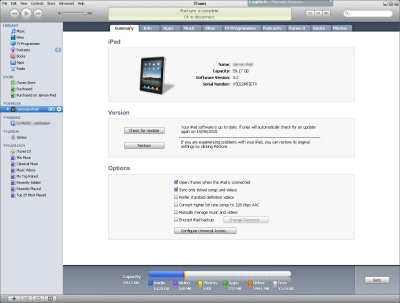 The I-pad and corresponding Iphone are meant to be easy to use devices for any one to use but just like any technology there are always some gotchas.
Unfortunately I am using itunes to do this. Install itunes and start it.
Plug in to fully functional USB socket. Some usb hubs don’t pass all signals along and therefore the device may not be properly recognised.
Once the device is recognised select it from the devices selection and ensure synchronisation of the device. Go to the tab music and enable synchronisation of music. I prefer to select the albums or gendres I want to synchronise but you may prefer to synchoronise your whole library.
When a folder or file is added it will typically be added enabled (ticked). If you un-tick it, it will not be synchronised with the ipad. This way you can select with song to down loads specifically and then select both or either the albums or gendre.
To force the synchornise (copy the songs on to your i-pad) select apply and then synchronise.
Email on a mobile phone
893016 years
Email via text message
Place the email address in the send to person. This can result in a new subject field being added.
You may need to set up the email service provider which for o2 is mail.o2.co.uk and 21203
To check the version of linux you are using
459To check the version of linux you are using
uname -r
To check the release of the version of linux you are using
llsb_release -a